Thursday, March 26, 2020

11 Insights to Support Safe Independent Senior Living

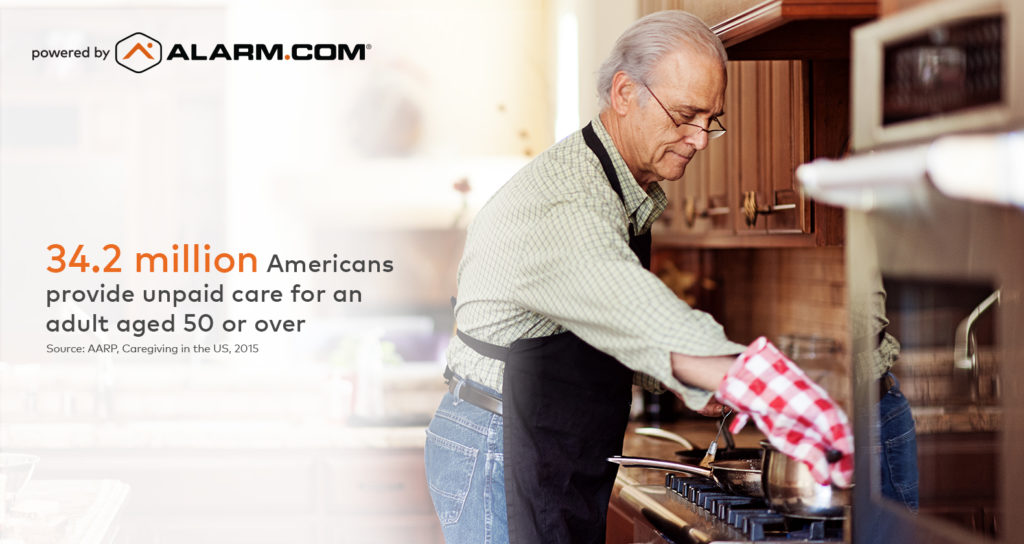
Over 34 million Americans provide unpaid care for an adult aged 50 or over. I am sure they are happy to do so for the most part. But, these are typically busy parents that are the main income providers for their own families as well as providing some form of care for their aged parents or other relatives.
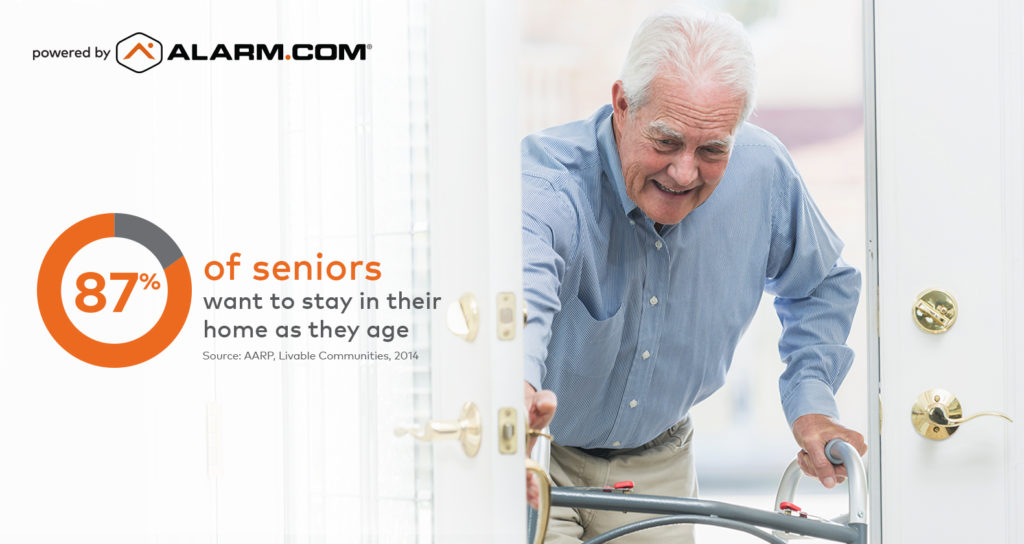
In addition, 87% of seniors are wanting to stay in their own home and have the freedom and independence they have always had. It can get challenging when their health and safety becomes more of a concern. If an aging loved one is looking to stay in their home longer but you are concerned about their safety, these 10 insights can help you look after your aging loved one and prevent any accidents. Alarm.com can use a variety of connected sensors and devices to discreetly monitor their daily habits and alert you when there are any abnormalities or sudden changes.
Here are the 11 insights to help support safe Independent senior living for your loved ones while making the caregivers life more manageable.

  1. Live video Check-Ins – Check-in on them visually to verify how they are doing. By using one of the indoor camera options you can see them and talk to them with two-way audio right from your phone. You can get notifications if there is activity or inactivity. With the wellcam they can even push a button if they want to talk to you.
  2. Video at the Front Door – Your loved one can answer the door using the video doorbell and you can check on who came to the door that will ensure their safe independent senior living.
  3. Personal Emergency – You can be notified immediately if the person you care for pushes a panic button. Using a wireless panic button as a pendant, wristwatch, or belt clip they can always be one push away from help and they can even detect a fall.
  4. Fall Prevention – We can have a light turn on automatically when a loved one gets out of bed in the middle of the night. This can ensure that they can see well and do not trip or run into anything in the dark.
  5. Potential Nighttime Fall or Event – With a bed sensor you can be notified if your loved one has been out of bed for a long period of time. Alarm.com Wellness Trends and Behaviors
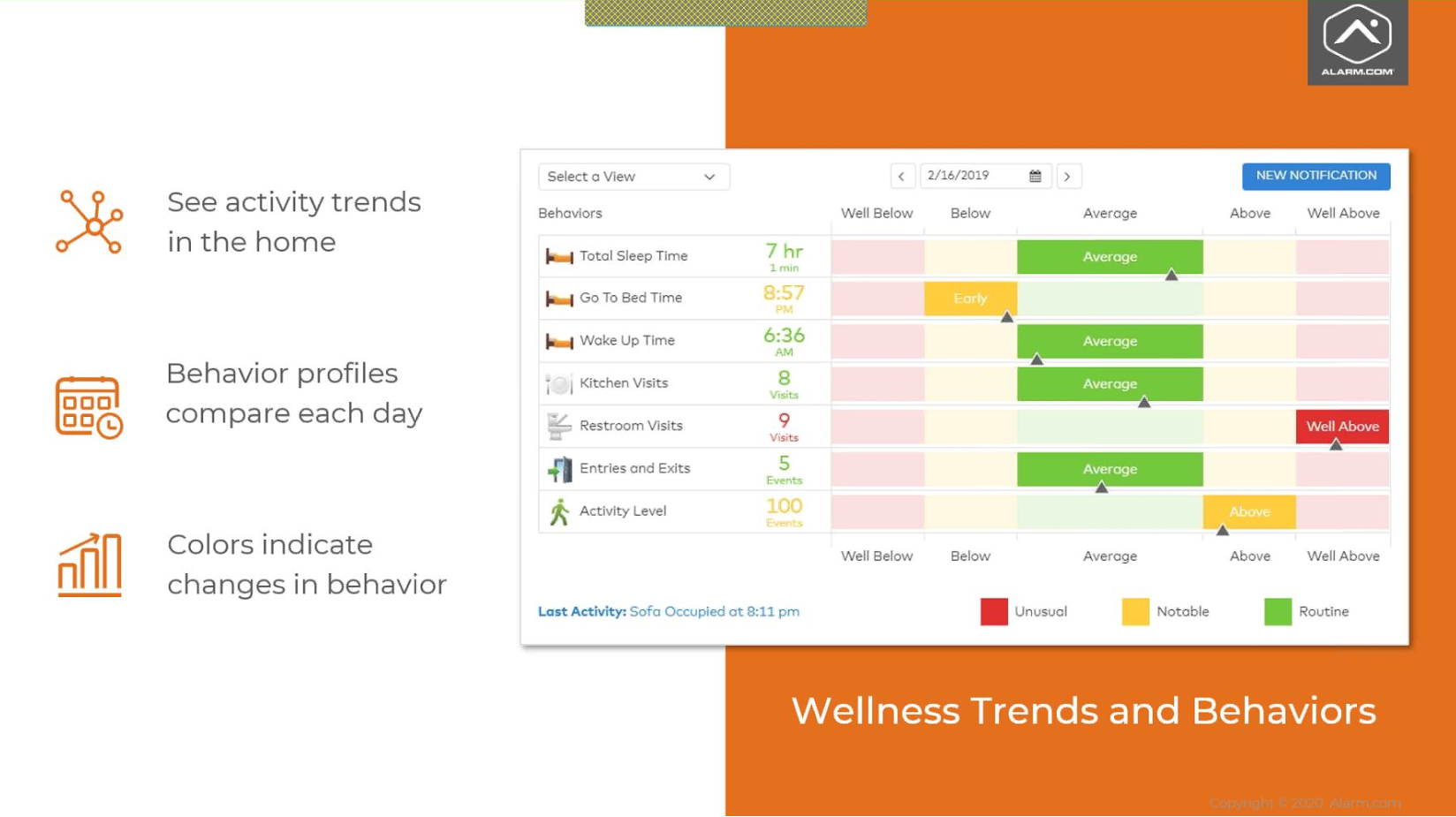
  6. Potential Illness – If your loved one is still in bed after the usual range of time you can get an alert letting you know. You can know their total sleep time, go to bedtime, and wake up time. Alarm.com will alert you if anything is out of the norm so you do not have to check these daily if you do not want to.
  7. Healthy Eating Habits / Medication Adherence – Eating habits are some of the most important things to monitor especially for the elderly so you can use Open/Close sensors to get a notification when a medicine cabinet or refrigerator door has been opened. You can use this to help them maintain a healthy diet and make sure they take their medicine. It can be accomplished with a door sensor.
  8. Potential Nighttime Wandering – You can keep track if the exterior door is opened at an unusual time and try to prevent a loved one from walking off unconsciously.
  9. Sedentary Lifestyle – We all have a loved one that loves to sits in his/her chair, but if they are spending more time than usual in it you can be notified. We can accomplish this with a chair sensor.
  10. Bathroom Frequency – If there are frequent trips to the restroom it could be good feedback for medical professionals that they might need to change or check on something. This can be accomplished with a combination of door sensors, motion detectors, and a bed sensor.
  11. Home Temperature in the Normal Range – some of our older loved ones cant see as well and may set their thermostat to the wrong temperature. You can use a smart thermostat to monitor the temperature in their house and set it to the correct temperature remotely from your smartphone.

These 11 insights can help you keep track of your loved one while you are busy with work and maybe even younger children or grandchildren. Alarm.com has a discreet way to set it and forget it so they can just alert you if anything is worth some additional attention in regards to your loved one. It learns patterns and then alerts you to anything that could indicate an upcoming health issue – before it turns into an emergency. Not only will these connected devices help give you peace of mind, but they can also increase the connection between you and your loved one.

Please contact us if you have any additional questions we can help with.

The post 11 Insights to Support Safe Independent Senior Living appeared first on Zions Security Alarms - ADT Authorized Dealer.


Article source here: 11 Insights to Support Safe Independent Senior Living

Wednesday, March 25, 2020

Creating Peace of Mind Using Our Security System Mobile App While Home Quarantined

The following article covers how the Alert 360 security app can help keep you safe during these times.

Alert 360 home security systems and security system mobile app can be a source of great comfort and peace of mind. A home security system, with a mobile app function, can also provide convenience and an extra hand while you’re at home. The following are the most common ways homeowners with a home security system use their service to stay safe, comfortable and connected while home or away.

Use home security “Scenes” to control home functions

With the Alert 360 mobile app, you can set custom “Scenes.” These Scenes allow you to control routine and multiple functions around your home from your phone, laptop or Apple watch – with one tap. An example of a custom Scene you might use would be turning lights off, locking doors and arming your security system at bedtime.

There are numerous ways to set custom Scenes that make the most sense for your family, routine and situation. It’s just one more way your home security system can make your life easier, safer, and more comfortable. For additional tips on using Alert 360’s home security Scenes, review our blog “Use Home Security App Scenes to Automate Security.”

Check that doors are locked from anywhere

Whether you’re running to the store or settling in for a nap and want to check if your house is secure, your mobile app can help. If your home security system includes keyless entry or smart locks, you can check or control them using your mobile app.

You can also use your mobile feature to arm or disarm your home security system, from almost anywhere. The great thing about this function is that it can be used from inside your home or when you’re away from home.

See who’s at the door using doorbell security cameras

Today’s doorbell cameras provide an extra layer of security at your front door. At Alert 360, our top-rated doorbell cameras include two-way voice and notifications. This means you’ll be alerted when someone is at the front door and can speak to them from afar. You can also use the doorbell camera along with your security system’s smart lock and arm/disarm app functions to remotely allow in approved visitors.

Know when important deliveries arrive at your front door

Another feature of your front door security camera is the ability to see when deliveries arrive. As with most of the features of your home security system, this works whether you are home or not. For all the features and benefits of our video doorbell camera, check out our past blog:

Options, Features, and Benefits of the Top-Rated Video Doorbell Camera

Ensure that children are safe using security cameras, alerts

We can’t be everywhere at once. Sometimes remote office work or other tasks require we be away from our family members. Home security cameras and push notifications to help you stay aware and connected. Your home security system most likely includes an option to receive an alert when a door or sensitive area is accessed. You can also ensure you receive an alert if a security camera picks up activity or an unusual event. Following are our other blogs, with more information on using your home security cameras and system:

Simplify your life by using home security, security cameras, home automation
Top 10 Ways Homeowners Use Security Cameras

Use home automation to create a comfortable home environment

Our homes are our sanctuaries. Today’s leading home security systems include home automation options that help adjust lighting, temperature, sound systems and more. These features and remote-control options are available whether you use Alert 360 Scenes or simply adjust a smart device using your mobile app.

Take advantage of connected, smart devices

During the installation of your home security system or anytime, our technicians can help integrate or install several smart devices. These devices include the Rachio smart sprinkler, Amazon Echo, Alexa, Google Home, and Sonos wireless speakers. Integrating your home security system with these devices increases the comfort, convenience, and security of your total smart home.

More Information for Using Home Security Features, Benefits

As a leading home security company, at Alert 360, we understand all the ways our home security and home automation systems can lend a hand and keep you safe. We know that there are many ways our customers use their security system’s smart features even while at home. For more tips on getting the most out of your home security system and its features, we recommend these helpful blogs:

5 Surprising Benefits of Having a Security System
Make the Most of Your Home Security Mobile App
Easily Protect Your Family, Property, and Pets with Home Security Cameras

If you also have a business security system, these features are useful when you need to be away or your business is closed. Security cameras help view the inside and outside of your business, and remote access can allow approved personnel entry. The ability to control your smart thermostat also can help save energy costs when you’re not operating your business. Smart lighting that you remotely control or automate helps protect your business as well.

Home and business owners interested in learning more can contact us for a free security consultation at Alert360.com. Alert 360 customers are welcome to call anytime or visit our website for more information about all our options. We have local home security offices in cities across the country. See below or find a local branch here.

Branch offices:
Anaheim, CA
Austin, TX
Dallas, TX
Clinton, OK
Fort Worth, TX
Fresno, CA
Houston, TX (North Office)
Houston, TX (South Office)
Kansas City, KS
Miami, OK
Oklahoma City, OK
Phoenix, AZ
Sacramento, CA
San Antonio, TX
San Diego, CA
Sarasota, FL
Springfield, MO
Tulsa, OK
Wichita, KS

The Alert 360 blog is recognized as a top 10 home and business security Blog post in the nation!

The post Creating Peace of Mind Using Our Security System Mobile App While Home Quarantined appeared first on Alert 360.


Article source here: Creating Peace of Mind Using Our Security System Mobile App While Home Quarantined

Saturday, March 14, 2020

ADT Adds Local recording Option to its ADT Command and Control Line Up

ADT has announced that you can now add a local recorder to your ADT Control System. Introducing the ADT Command and Control Stream Video Recorder. It can be especially helpful if you are wanting non-stop recordings instead of just the cloud clips every 30 seconds or so. It also can become necessary if you are using up cloud clips way to quickly each month.

The ADT Command and Control Stream Video Recorder has an HDMI output on the back that you can connect to a TV or computer monitor and can have up to 8 ADT cameras connected to it at once. Of course the more cameras you add the fewer amount of days you will be able to fit on the hard drive. Currently, there is only a 1TB option, but additional options may come available in the future.

This new addition to the video line up with ADT Control makes a complete video solution that gives customers the best of both worlds. Recording on the cloud is attractive just in case someone steals your recorder, but also having a local recorder is nice so you can get 24/7 recordings.

Before ADT Control offered this option you had to install an IP Camera system if you wanted non-stop recordings. The IP Camera systems can be much more expensive and more labor-intensive to install. They can also be really hard to maintain since they rely on your IP address with your ISP not changing. The IP Camera system, however, is still the best option if you are wanting more than 1080P resolution. (like 4K cameras).

For more information contact us and we would be happy to help.

The post ADT Adds Local recording Option to its ADT Command and Control Line Up appeared first on Zions Security Alarms - ADT Authorized Dealer.


Article source here: ADT Adds Local recording Option to its ADT Command and Control Line Up

Wednesday, March 4, 2020

Alert 360 breaks ground on security retail experience center

Top-Rated home and business security company to offer hands-on experience for consumers interested in installing security or automation devices.

Alert 360, one of the nations’ largest providers of home and business security and automation, has broken ground in Tulsa on a new go-to-market concept – the Alert 360 Retail Experience Center.

The Alert 360 Retail Experience Center will allow Tulsa consumers to enjoy user-friendly, hands-on experience with some of the best home security, business security, and smart home solutions available. For convenience, Alert 360 is locating the center on one of the highest traffic corners in Tulsa, at the site of a former gas station. The company will create an inviting space for current and potential Alert 360 customers to view, interact with, and design an infinite number of options in home and business security, automation, and IoT (Internet of Things).

Voted as a Best Home Security Provider and awarded a Best Places to Work in Oklahoma for four consecutive years, Alert 360 has provided award-winning security services to thousands of Tulsa home and business owners for nearly a half-century.

“With the integration of home and business security systems with automation, smart devices, and smartphones, our services have become commonplace and popular especially among Tulsa’s tech-savvy home and business owners,” said Don Fuson, general manager, Alert 360 Tulsa. “Home and business owners most often use our free mobile app to view, connect with, and manage their homes or workplaces when they can’t be in two places at once, so it makes sense to provide a convenient location for people on-the-go to stop and visit with us.

“Today’s security solutions – from security cameras, doorbell cameras and smart locks to automated lights and entertainment systems – are easily operated with the tap on a keypad, phone, or Apple Watch. Our new Alert 360 security retail space will provide a place for security consumers to experience this and more,” Fuson added. “We chose a high-traffic space that would allow customers who are interested in security or home automation to stop by, easily park, and visit.”

At Alert 360, we support more than 75 different IoT and security products and there is no better way to show our capabilities than in person. Additionally, as a Tulsa-based home and business security company, this is an ideal place to launch our first combined retail and branch location, which can be emulated across our national footprint.”

The retail center will contain a more robust version of Alert 360’s Mobile Experience Centers, which were launched in 2018 and have been successful in demonstrating the many benefits of today’s and future security and automation products to thousands of consumers. As a top 5 home security company in the nation, Alert 360 partners with global technology providers to continually develop and offer home security and business security services that create a better experience for consumers, including this new retail center.

“Today more than ever, tech-based companies especially need to adapt to the changing competitive landscape and have the courage to innovate with different go-to-market strategies. While we have focused significant marketing on the digital front at Alert 360, there is nothing like a consumer being able to touch, feel, and try our security products in person and participate in a demonstration with an Alert 360 security and automation expert,” said Richard Ginsburg, president and CEO, Alert 360.

Alert 360’s new Retail Experience Center in Tulsa also will have an open-air event space. In this space, the company plans to host community events and open houses, sharing valuable security tips, crime prevention solutions, and support of local Tulsa charitable efforts. The Alert 360 Retail Experience Center is scheduled to open in the third quarter of 2020, with a showcase of new Alert 360 products and services developed in conjunction with the company’s technology partners from around the world. W Design is serving as architects for the project.

“We are honored to be a part of Alert 360’s growth and to collaborate on the visual branding of the company’s new location at 61st & Sheridan,” said Weldon Bowman, founder and principal, “It’s important to us to re-purpose Tulsa’s existing architecture by creating a unique experience for Alert 360’s customers, as well as the general public.”

In Oklahoma and beyond, Alert 360 provides a full line of home security, business security, energy management, and home automation services. These products and services include wireless security systems, a free mobile app, wireless home security cameras, HD video surveillance, access control, smart thermostats, water leak detection devices, doorbell cameras, monitored heat and carbon monoxide detectors and more. Alert 360’s certified security technicians also offer professional installation or integration of smart home devices, such as sprinkler systems, sound systems, Amazon Echo and Google Home.

The current Alert 360 Home Security – Tulsa branch is located at 3158 S. 108th St. E. Ave. and serves cities in the surrounding area, including: Adair, Afton, Avery, Bacone, Bartlesville, Baugh, Bearden, Beggs, Bixby, Bond, Bristow, Broken Arrow, Bushyhead, Catoosa, Centralia, Choska, Chouteau, Claremore, Coalton, Collinsville, Coodys Bluff, Drumright, Eufaula, Fairland, Glenpool, Hartshorne, Haskell, Herd, Hominy, Hugo, Inola, Jay, Jenks, Jennings, Kellyville, Kendrick, Kiefer, Locust, Grove, Lotsee, Mannford, McAlester, Miami, Mounds, Muskogee, Nuyaka, Oologah, Owasso, Peoria, Poteau, Pryor, Salina, Sapulpa, Skiatook, Sperry, Tahlequah, Wagoner, Wyandotte.

In addition to its Tulsa location, in Oklahoma, the company operates an award-winning alarm monitoring and customer service center in Tulsa and has branches in Clinton, Miami, and Oklahoma City. Alert 360 also has a network of branches from coast to coast, providing local security services for its more than a quarter of a million home or business security customers. Your Local Alert 360 Home Security Company Can Help! Home security specials up to 25% off retail! Find a local Alert 360 home and business security office here.

About Alert 360
Founded in 1973, Alert 360 is one of the nation’s oldest-licensed alarm monitoring providers. Today, the company is the fifth-largest provider of monitored home security and home automation solutions in the United States. The company has achieved Five Diamond alarm monitoring designation and has been named an Inc. 5000 “Fastest-Growing Privately Held Company in America,” a “Best Home Security Provider,” and a “Best Places to Work.”


Or, schedule a free home security and home automation evaluation with one of our local security teams in the following locations:

Branch offices:
Anaheim, CA
Austin, TX
Clinton, OK
Dallas, TX
Fort Worth, TX
Fresno, CA
Houston, TX North office
Houston, TX South office
Kansas City, KS
Miami, OK
Oklahoma City, OK
Phoenix, AZ
Sacramento, CA
San Antonio, TX
San Diego, CA
Sarasota, FL
Springfield, MO
Tulsa, OK
Wichita, KS

The Alert 360 blog is recognized as a top 10 home security Blog post in the nation.

The post Alert 360 breaks ground on security retail experience center appeared first on Alert 360.


Article source here: Alert 360 breaks ground on security retail experience center

Thursday, February 27, 2020

Smart Video Cameras For Your Business

Imagine you can see what is happening at your business even when you are not there. With our Smart video cameras you will never miss an important moment.

Check in on your business anytime with live stream video and stay connected no matter where you are. You just need an internet connection at your business and either a POE Switch or a WiFi Gateway. There are smart POE wired cameras and there are smart WiFi Cameras also. The PoE cameras just need a cat5 or cat6 wire ran to them. The WiFi ones just need an outlet to plug them in.

Extend Your Business Security with Perimeter Protection powered by video analytics. With these smart video analytics you can actually set your video to alert you when something important is going on and you will have much fewer cloud recordings.

They use advanced AI and computer vision so they can know and identify what they are looking at. As time goes on the cloud just gets smarter and smarter making it even easier to identify what it is looking at.

Smart video cameras can tell the difference and alert you when it sees vehicles, animals, or people. The way this works is alot like teaching a small child. When they are correct you reward them and acknowledge it. When they are wrong, you point it out as well. Over time it learns and gets better and better at telling the difference between a person and a tree or a car and a rock, etc…

With smart video cameras they will Ignore changes in weather or lightning so you do not get flooded with alerts or fill up your cloud recording without reason. This is amazing because most cameras will record when there is any pixel motion. They will see a shadow move, a leaf blow, or a rain drop and record it all. This makes it so you cannot ever set up alerts since you do not want a million of them. It also makes it easier for you to find the clip you are wanting to see instead of looking at hours and hours of nothing.

With smart video analytics you can set up trip wires or detection areas. These help you make sure you are not recording areas that are of no importance to you. They also help make sure that your alerts are ones you really care about.

You can set it to alert you only when your security system is armed, or all the time. You can choose what alerts you get and when. This makes it even nicer especially if you only want alerts after hours. When you set up alerts you can see who is at your business after hours to make sure it is someone that should be there.

If you have important property outside you can protect it with intelligent alerts. You can also know if someone is dumping illegally on your property or inside your dumpster.

You can also know about important activity at your business like if a delivery came, or when an employee arrives to work. You can also know each time an employee enters a sensitive or secure area.

When the alarm system reports an alarm, the smart video cameras will start recording allowing you to see what happened before and after the alarm went off.

Stay connected to your business with Smart Video Cameras.

The post Smart Video Cameras For Your Business appeared first on Zions Security Alarms - ADT Authorized Dealer.


Article source here: Smart Video Cameras For Your Business

Thursday, February 20, 2020

Simplify your life by using home security, security cameras, home automation

Home security options save time, money and peace of mind

If a goal for 2020 is to simplify your life, there’s good news. Your home security system can help! A smart home security system offers a multitude of ways to save time, money and peace of mind. It can lend a hand whether you’re a busy parent, traveling the world or living alone during your twilight years. With your Alert 360 security system’s Geo-Services, Scenes, security cameras, smart lighting or locks, and monitored detectors, it’s easy to simplify life. Bonus: These home security options reduce worry and keep loved ones safer.

Tips for using your home security system to make life simpler:

Use Alert 360 security system’s Geo-Services or “Geofencing” – Imagine if your house knew you were close to home and adjusted the lights and temperature. Would you find it helpful to receive a reminder if you left home without locking your front door or arming your security system?

Alert 360’s Geo-Services can help. Geo-Services are a location-based, smart home automation feature that uses your phone’s location to take useful actions on your behalf. These range from a simple notification to a real action, such as adjusting your thermostat or arming your security system.

When you reach a certain distance from home – defined by a “geo-fence” – Geo-Services will take action automatically. You have the ability to create your unique geo-fence in our Alert 360 app. With so much on our minds as we come and go, reminders or automatic actions help create a smoother start or end to our work and school days.

Geo-Services simplify your life by helping with routine, daily steps even when you have a gazillion things on your mind.

Set Alert 360’s Home Security “Scenes” – Our Alert 360 app “Scenes” give you the ability to adjust multiple, connected devices in your home, using a single command on your phone or tablet. Using existing “Scenes” or setting up your own lets you control your home security or smart home devices with a simple tap. This remote control saves you time and worry and makes routine parts of your day, safer, easier, or more comfortable.

Alert 360 includes preset Scenes of Home, Away, Sleep, and Wake Up as part of our app. However, based on your needs and routine, you’re free to set up Scenes that make sense to you. Your Scenes might include options such as Movie Night, Vacation, After School, or Weekend. Then, simply configure each Scene for a moment where you need to adjust several things at once.

Leaving home? Tap the ‘Away’ button and your security system arms and your front door locks. You might set it so that your garage door also closes and your thermostat adjusts to save energy. At bedtime, tap ‘Sleep’ to dial down your thermostat and turn off lights, while your house secures itself. Don’t forget the cool factor of one-tap control using your security system: Impress your spouse with a date night Scene, where you adjust lighting and turn on some dance-worthy tunes.

These are just a few examples of how you might customize your “Scenes” to easily automate or control your home. For more details about using our Alert 360 app to set Scenes that work for you, visit our previous blog:

Easy Steps to Get you Started Using the Alert 360 Mobile App Scenes

Security system “Scenes” simplify your life by providing one-tap control of your total smart home.

Use home automation, smart devices to set schedules – Your smart devices, security system and home automation services allow you to “set it and forget it.” So that you don’t have to arrive to a quiet, dark home, use home automation to automatically turn on lights and your entertainment system at preset times. Set your smart thermostat to conserve energy while your family is away for the day. When you’re out of town, set a schedule for your sprinkler system to run. Automate smart lighting so that your home does not appear dark and unoccupied. Like Geo-Services, setting schedules helps add comfort and security without much effort on your part.

Home automation and smart devices simplify your life by allowing you to “set it and forget it.”

Make the most of your security notifications – Security alerts or push notifications that you set using our app help make your home and family safer. In addition to professional alarm monitoring, when you set security alerts, you don’t have to monitor your own system constantly but will be alerted if something is amiss. You can relax! For example, you have strict rules about pool use when you’re away. Simply set an alert to receive notification when the pool area is accessed. Notifications can be set for when kids arrive home, a gun safe is accessed or someone comes to your front door. If your home security system also includes home security cameras, you can view what’s happening when you receive an alert.

Alerts from your home security system help you relax and simplify your life, knowing you’ll be notified if something needs attention. Bonus: A monitored home security system also ensures emergency personnel will be alerted as well, so help arrives sooner.

Take advantage of smart lighting, locks – Similar to setting schedules, using Geo-Services or Alert 360’s Scenes, smart lighting, and locks offer tremendous convenience. What if a child forgot his keys? He can still get in using your smart lock. Your teenager is arriving home later than expected, use your Alert 360 app to turn on smart lighting inside or outside for a safer, brighter return. Someone unexpected visits your front porch, turn on a light to see more clearly who stopped by. When you’re away on vacation or are having remodeling done, allow access to house sitters or others from afar and ensure all is secure when they’ve left.

Security systems with smart lighting simplify your life by ensuring a safe, bright return home and making a home appear occupied. Security systems with smart locks add convenience and prevent worry.

Install home security cameras – This is a no brainer for helping to simplify your life and decrease stress. Home security cameras allow you to visually check in on pets, children, elderly parents and your property. We can’t be in two places at once. Being able to see what’s happening when you’re away delivers convenience and peace of mind. At Alert 360, some of our customers’ favorite uses for security cameras include seeing when children arrive home or who’s at the front door. They enjoy knowing when packages arrive or if anyone entered their properties during the day. Some home security customers enjoy seeing that elderly parents and pets are safe.

Home security cameras help simplify your life when you can see what’s happening at home. Security cameras also allow you to capture video clips for insurance or liability issues.

Install monitored water leak, smoke and carbon monoxide detectors – Some of the most costly and common insurance claims are related to water and fire damage. Homeowners with a security system can easily include monitored water, smoke and carbon monoxide detectors for early awareness and help from emergency personnel. Along with a monitored home security system, installing these detection devices might provide a discount on your home insurance premium. In addition to the peace of mind, knowing you’ll be alerted to danger or damage, monitored security devices can save you costly repairs.

Monitored water leak, smoke and carbon monoxide detectors help simplify your life by providing invaluable protection and one less thing to worry about.

Set it and Forget it, with Convenient Home Automation, Home Security

With a simple tap on our Alert 360 app or using our convenient home automation settings, you can simplify your days. Eliminate worry, automate lights and locks, ensure your home is secure and more, using your home security and home automation system. For more ways your home security system can save time, money, and worry – simplifying your life – visit our previous blogs:

How Water Sensors Can Help Prevent Costly Water Damage
Home Automation Devices Help Reduce Energy – Save Money!
Alert 360 Shares 4 Tips to Save You Money!
What’s Popular in Smart Home Automation Products?
Use Home Security App Scenes to Automate Security
Spring Fever Have you on the Go? Make the Most of Your Home Security Mobile App


Or, schedule a free home security and home automation evaluation with one of our local security teams in the following locations:

Branch offices:
Anaheim, CA
Austin, TX
Clinton, OK
Dallas, TX
Fort Worth, TX
Fresno, CA
Houston, TX North office
Houston, TX South office
Kansas City, KS
Miami, OK
Oklahoma City, OK
Phoenix, AZ
Sacramento, CA
San Antonio, TX
San Diego, CA
Sarasota, FL
Springfield, MO
Tulsa, OK
Wichita, KS

The Alert 360 blog is recognized as a top 10 home security Blog post in the nation.

The post Simplify your life by using home security, security cameras, home automation appeared first on Alert 360.


Article source here: Simplify your life by using home security, security cameras, home automation

Friday, February 14, 2020

ADT Control Crash and Smash Protection

“The security system for your security system.”

When you hear the words ADT Control Crash and Smash protection, you may envision a service that keeps superheroes safe from a giant green rage monster whose hulking physique strikes fear into the hearts of everyone around him. However, as exciting as that would be, the ADT Control Crash and Smash protection that we’re talking about is a little less action-packed, but still a very big deal!

You might be wondering what a Crash and Smash is and why you would need protection from it. Well, here’s the short version: It’s when a burglar crashes through the front door, hurries to find your alarm system panel, and smashes it before it can send an emergency signal to your home monitoring service provider.

So, why would this destructive plan be one of the first choices for thieves? Because, unlike ADT Control, many security systems don’t have Crash and Smash detection technology. Therefore, if the burglar can get to the alarm panel fast enough to destroy it, they’re likely to get away undetected.

How this works is when you walk into your home, the alarm panel beeps to signal the entry delay timer. This timer is usually 30-60 seconds long to give you time to disable your alarm system, either by disarming it on your smartphone app or by walking to the panel and inputting your security code. It is during this entry delay period that your security system could be the most vulnerable.  If the panel is destroyed before the entry delay time expires, your alarm isn’t set off, an alert isn’t sent to the authorities, and your home is burglarized in a matter of minutes.

With the Crash and Smash technology, programmed in every ADT Command Panel as part of the ADT Control system, the period between the alarm being activated and an emergency signal being sent is protected. Your system detects when the entry delay countdown begins and takes note. If during the countdown your panel suddenly goes offline before sending a ‘disarm’ or ‘emergency’ signal, then ADT reports a suspected Crash and Smash event to your home’s central monitoring station. From there, the situation is assessed by a trained security professional who then alerts law enforcement of the Crash and Smash intrusion.

This advancement in home security technology ensures that your home and family are safe, even if your Command Panel is disabled or destroyed. The ADT Control Crash and Smash protection is just another advantage to choosing ADT for your home security.

The post ADT Control Crash and Smash Protection appeared first on Zions Security Alarms - ADT Authorized Dealer.


Article source here: ADT Control Crash and Smash Protection